

How to Log In and or Request a Link to Reset your Password

Step 1. Navigate to the Slate Registry Login Page
-
Navigate to your registry landing page.
-
Click the [Sign In] button located in the upper right-hand corner.

Step 2. Select 'Send me a link to log in'
-
Select 'Send me a link to log in' to receive an email at the address associated with your account.

Step 3. Enter Email address for log-in instructions
-
Enter the email address you use to log in to receive instructions for accessing your Slate Registry user account.

Step 4. Check Email for Instructions
-
Check your inbox for an email of instructions.
-
This should be received within minutes of requesting the email.
-
Please check your spam or junk folder if you do not see the email.
Step 5. Select the link to Reset your Password
-
Open the instructions email and click the enclosed link to access your Slate Registry user account.
-
Please note: The Magic Link will expire 15 minutes after the email is delivered.

Step 6. Success! Set new Password or Cancel to enter
-
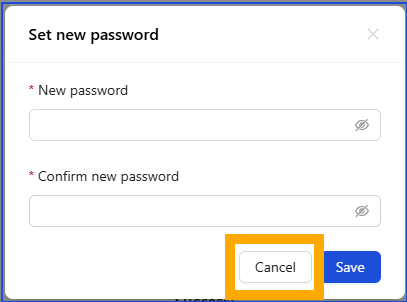
To reset your password, enter your new password details in to the required fields.
-
To enter your account without updating your password select the [Cancel] button.
-
If you opt to not update you password but would like to do so from within your account review Step 7.
Step 7. Update your Password from within your Account
-
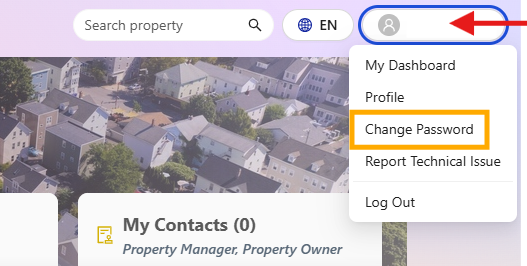
Click your username in the upper right corner
-
Select 'Change Password' to make your update.
Step 8. Enter New Password
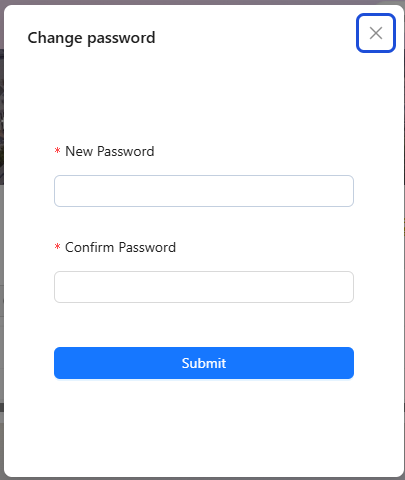
- In the new popup window, enter your new password and reconfirm it. Then, click 'Submit' to save your changes.
- Congratulations! You have successfully updated your password.
- Return to your main Slate Registry dashboard.
If you have any questions please contact the Tolemi Support Team at [email protected] for additional assistance.

