


How to Change your Password in Slate

Nov 26, 2025
 235
235
Step 1. Log in to your Slate Account
- Begin by logging into your Slate account.

Step 2. Navigate to the User Profile
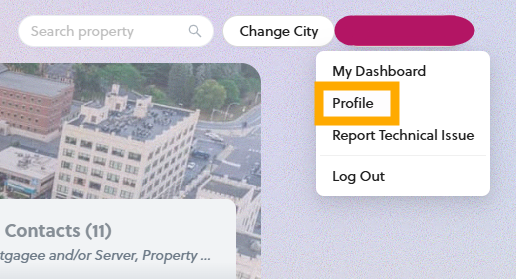
- Located in the upper right corner highlighted in red is your user profile
- Click your name to open the dropdown menu
- Select “Profile”to open the Profile window.
Step 3. Change your New Password
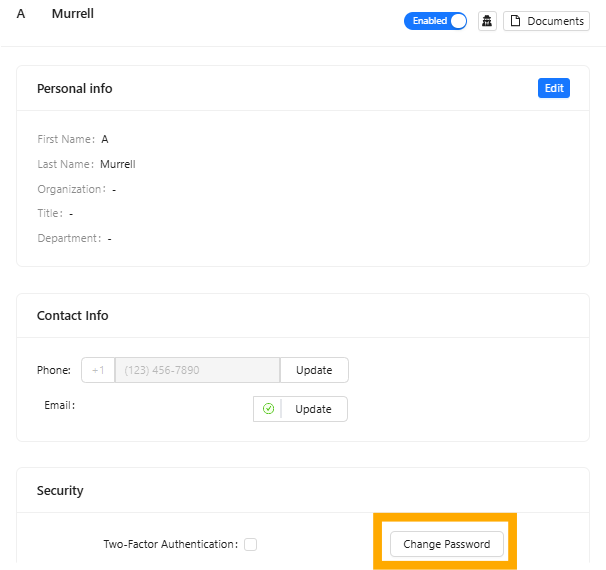
- Click the [Change Password] button to open the Change Password window.
Step 4. Create and Save your New Password
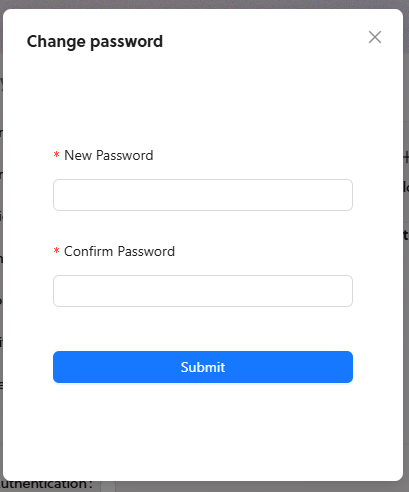
- Enter your new password in the “New Password” field.
- Confirm your new password by reentering it in the “Confirm Password” field.
- Select submit when finished.
If you have any questions or need further assistance, please contact the Tolemi Support Team at [email protected].

